
Practical, actionable roadmap that actually works right now – built for Excel pros ready to level up without spending a dime.
If you’re already comfortable in Excel and wondering how to move from static spreadsheets and pivot tables to dynamic, interactive dashboards that update automatically and even leverage AI, you’re asking the right question at the right time.
Power BI skills are in high demand across the USA in 2026. Data analyst roles that include Power BI frequently appear in job postings, and professionals who combine strong Excel foundations with Power BI, Power Query, DAX, and an understanding of SQL or Python integrations command stronger positioning in the market. Average salaries for data analysts range from roughly $82,000 to $111,000 depending on experience, location, and tool stack, with Power BI-specific roles often falling in a similar or slightly higher band.
The problem? Hundreds of “free Power BI courses” exist, but many are outdated, overly salesy, or lack the structure Excel users actually need. You don’t want another 20-hour YouTube marathon that leaves you confused about data modeling. You want a clear path that respects your existing Excel skills and delivers real, job-ready results in 2026.
This ultimate guide cuts through the noise. I’ve researched the current landscape (Microsoft Learn updates, 2026 feature releases like enhanced Copilot summaries and visual calculations, community feedback, and job market signals) and tested what actually works for practical learners. You’ll get:
- A curated list of the best free options right now
- The ExcelPro 2026 Power BI Mastery Roadmap (original framework tailored for Excel users)
- Exact step-by-step actions to start today
- How to handle 2026 AI trends (even when full Copilot requires paid licensing)
- Portfolio and career advice that turns free learning into real opportunities
- Direct answers to the questions people actually ask
By the end, you’ll have a personalized plan and the confidence to start building production-ready reports this month.
Why Power BI Skills Are a Smart Move in 2026 (USA Focus)
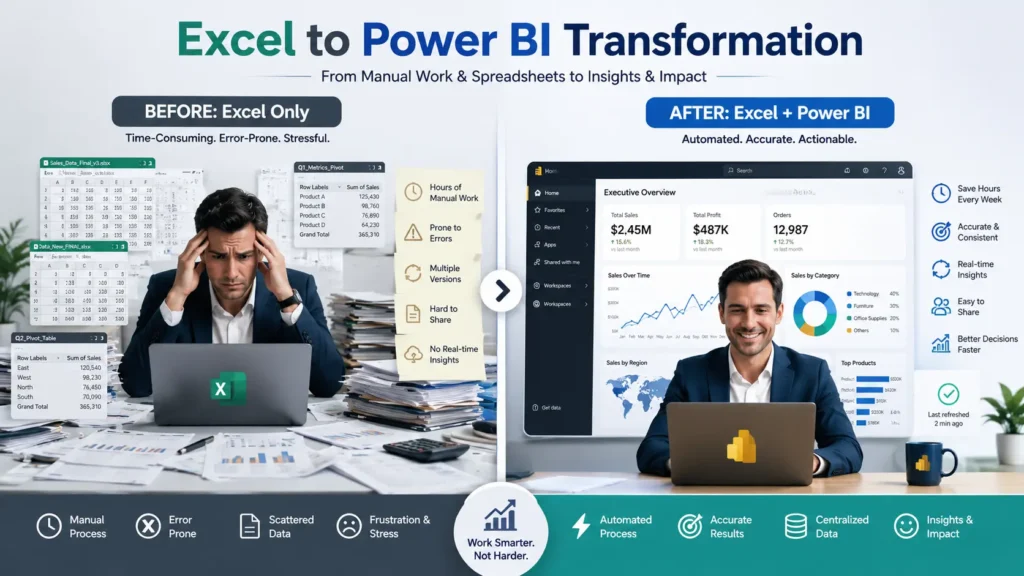
Power BI isn’t just “Excel with prettier charts.” It’s the natural next step for anyone who already thinks in tables, relationships, and formulas.
Key advantages for Excel users in 2026:
- Power Query lives in both Excel and Power BI – your existing skills transfer directly.
- DAX is like advanced Excel formulas on steroids (with better performance and context awareness).
- You can connect to dozens of data sources, create a proper data model once, and refresh reports automatically.
- Microsoft continues investing heavily: visual calculations are now generally available, Copilot summaries are improving, and Fabric integration is expanding.
Job market reality: Power BI ranks among the most-mentioned BI tools in data analyst postings. Employers value the combination of Excel + Power BI + data storytelling. Many roles now expect or prefer candidates who can also work with SQL or basic Python for data prep.
Bottom line: If you already invest time in Excel, adding Power BI multiplies your output and market value faster than almost any other single skill.
How We Evaluated These Free Courses
We didn’t just list popular options. We scored them on criteria that matter in 2026:
- Depth & Structure – Does it cover data modeling, DAX, and real projects, or just drag-and-drop basics?
- 2026 Relevance – Updated content covering current features (Copilot awareness, visual calculations, improved AI visuals)?
- Excel Synergy – How well does it build on or contrast with Excel workflows?
- Hands-on Practice – Downloadable files, labs, or projects you can actually complete for free?
- Path to Certification or Job – Clear progression toward PL-300 or portfolio pieces?
- Community & Support – Active help when you get stuck?
- Honesty about Limitations – Transparent about what requires paid licensing (e.g., full Copilot).
Only resources that scored highly across most categories made the cut.
Top Free Power BI Courses & Resources in 2026
Here’s the honest comparison:
Comparison Table
| Rank | Resource | Format | Approx. Time | Certificate | Best For | Excel Synergy | 2026 Updates | Drawbacks | Link |
|---|---|---|---|---|---|---|---|---|---|
| 1 | Microsoft Learn Power BI Paths | Self-paced modules + labs | 15–30+ hours | No (free practice assessments) | Structured learning + PL-300 prep | High (builds modeling concepts) | Excellent (regular updates) | Can feel dry without projects | learn.microsoft.com/training/powerplatform/power-bi |
| 2 | Chandoo Power BI YouTube (Free Playlist) | Video tutorials + files | 12–15 hours | No | Practical Excel-style learning | Excellent | Good (regular new videos) | Less structured than paths | YouTube Chandoo Power BI playlist |
| 3 | Great Learning Free Power BI Courses | Short modules + quizzes | 2–6 hours per course | Yes (paid for cert) | Quick start + certificate | Good | Solid basics | Limited depth for advanced topics | mygreatlearning.com/power-bi/free-courses |
| 4 | edX: Analyzing Data with Microsoft Power BI | University-style course | 4–8 weeks | Audit free, cert paid | Academic + structured | Medium | Good | Slower pace | edx.org |
| 5 | Coursera Microsoft Power BI courses (Audit) | Video + assignments | Varies | Audit free | Supplemental structured content | Medium | Good | Full access requires payment | coursera.org |
| 6 | Other YouTube Full Courses (Simplilearn, etc.) | Long-form video | 9–20 hours | No | Quick immersion | Medium | Varies (many “2026” titled) | Quality/consistency varies widely | Search YouTube “Power BI Full Course 2026” |
Deep Dive into the Top Recommendations
1. Microsoft Learn Power BI Learning Paths (Best Overall Free Option) This is the gold standard. Microsoft provides multiple free, self-paced learning paths covering everything from “Get started with Power BI” to “Model data with Power BI,” “Build visuals and reports,” and analytics-focused modules. Many include hands-on labs in a sandbox environment.
It directly prepares you for the PL-300: Microsoft Power BI Data Analyst Associate certification (no prerequisites, free practice assessments available). Content is regularly updated and aligns with current features.
Why it wins for most people in 2026: Official, trustworthy, comprehensive, and completely free. Pair it with projects (see roadmap below) and you have a complete free education.
2. Chandoo Power BI YouTube Playlist + Resources (Best for Excel Users) Chandoo (well-known Excel educator) offers a high-quality free YouTube playlist with downloadable sample files. Teaching style feels familiar to Excel users – practical, no-nonsense, focused on real business scenarios. Excellent for understanding how Power Query and modeling concepts translate from Excel.
Many learners use Chandoo videos alongside Microsoft Learn for the “how does this actually look in practice?” moments.
3. Great Learning Free Power BI Courses Short, well-produced modules on Introduction to Power BI, Data Visualization with Power BI, etc. You can complete several in a weekend. Certificates are available for a fee, but the learning itself is free. Good confidence booster and quick wins.
Honorable Mentions & Warnings Long “Power BI Complete Course 2026” YouTube videos from various channels can be useful for immersion but vary wildly in quality and accuracy. Use them for specific topics after you have structure from Microsoft Learn or Chandoo. Always cross-check official docs for the latest behavior.
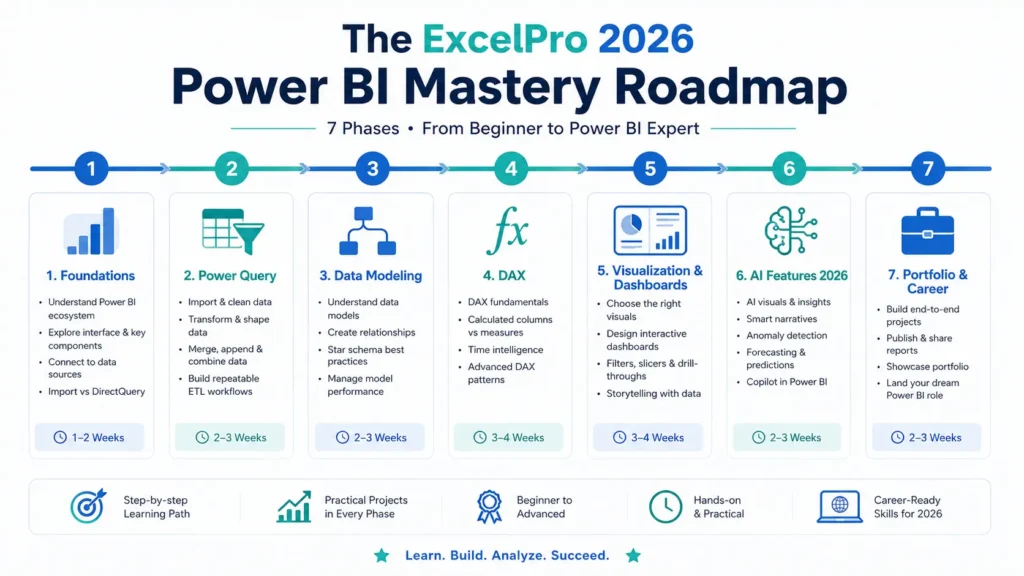
The ExcelPro 2026 Power BI Mastery Roadmap
This original framework turns scattered free resources into a clear, actionable journey. Designed specifically for Excel users.
Phase 1: Foundations & Mindset Shift (Week 1)
- Download Power BI Desktop (free).
- Complete Microsoft Learn “Get started with Power BI” path.
- Watch Chandoo’s “Your first 10 minutes of Power BI” or equivalent.
- Key mindset: Power BI is not Excel on steroids – it’s a proper BI tool with a semantic model at its core.
Phase 2: Data Preparation Mastery – Power Query (Weeks 2–3)
- Master Power Query in Power BI (your Excel Get & Transform skills transfer).
- Practice: Connect to Excel/CSV, clean messy data, create reusable queries.
- Resources: Microsoft Learn Power Query modules + Chandoo videos.
- Milestone: Transform a real messy Excel export into a clean model.
Phase 3: Data Modeling & Relationships (Weeks 4–5)
- Learn star schema, relationships, and why they matter (this is where most Excel users struggle initially).
- Resources: Microsoft Learn “Model data with Power BI” path.
- Milestone: Build a multi-table model from sample sales + customer data.
Phase 4: DAX Fundamentals (Weeks 6–8)
- Start with basic measures (SUM, AVERAGE, COUNT), then CALCULATE, time intelligence.
- Resources: Microsoft Learn DAX modules + targeted Chandoo/SQLBI videos.
- Practice daily with DAX.do (free browser-based DAX editor).
- Milestone: Create a dashboard with YoY growth, running totals, and dynamic titles.
Phase 5: Visualization, Dashboards & Storytelling (Weeks 9–10)
- Design principles, custom visuals, bookmarks, drill-through.
- Build 2–3 end-to-end projects.
- Resources: Microsoft Learn report design paths + real-world inspiration from community.
Phase 6: AI Awareness & 2026 Features (Ongoing)
- Learn which AI visuals and smart features are available in free tier.
- Understand Copilot limitations (requires Fabric capacity or PPU).
- Practice natural language exploration where available.
- Resources: Microsoft Learn Copilot modules + “What’s new in Power BI” updates.
Phase 7: Portfolio, Certification Prep & Job Readiness (Weeks 11–12+)
- Polish 3 strong portfolio projects (sales dashboard, HR analytics, marketing attribution).
- Take free PL-300 practice assessments.
- Optimize LinkedIn and resume with specific Power BI achievements.
- Optional: Schedule PL-300 exam when ready (~$165, but prep is free).
Recommended weekly time commitment: 5–8 hours. You can finish core skills in 10–12 weeks while working full-time.
Step-by-Step: Start with Microsoft Learn Today
- Go to the official Power BI training page.
- Create a free Microsoft account (or sign in).
- Start with the “Get started building with Power BI” module.
- Work through one learning path at a time. Complete the knowledge checks.
- Download sample datasets from Microsoft or use your own Excel files.
- After each major path, build a small project applying what you learned.
- Join the Power BI community forums for questions.
This approach gives you official structure + immediate hands-on application.
Power Query & DAX: The Bridge from Excel to Power BI
Your biggest advantage as an Excel user is familiarity with data transformation and formulas. Power Query feels like a more powerful, repeatable version of Get & Transform. DAX extends what you already know about calculated fields and measures but with row and filter context.
Pro tip: Don’t try to do everything in DAX that you did with Excel formulas. Let the data model and relationships do the heavy lifting first.
2026 Trends: AI, Copilot, Fabric & What Free Learners Can Actually Use
Microsoft is pushing AI hard. Copilot in Power BI can generate visuals, write DAX, and summarize reports using natural language – but full access currently requires higher-tier licensing (Fabric capacity or Premium Per User).
What free users can still do in 2026:
- Use built-in AI visuals (key influencers, smart narrative, decomposition tree) – many work in the free tier.
- Practice prompt engineering for data questions.
- Learn semantic model best practices (Copilot performs better on well-modeled data).
- Follow “What’s new in Power BI” monthly updates for free features like visual calculations and improved summaries.
The smartest free learners focus on strong fundamentals first. AI tools amplify good models; they don’t fix bad ones.
Build a Job-Ready Portfolio with Free Tools
Employers care more about what you can build than which course you finished. Create:
- Sales Performance Dashboard (with drill-through and dynamic measures)
- Customer 360 or Retention Analysis
- Operational or Financial KPI Tracker with forecasting elements
Host .pbix files on GitHub or OneDrive (with sample data). Document your process in a short README or Notion page. Add these to your LinkedIn and resume with specific outcomes (“Reduced reporting time from 8 hours to 15 minutes”).
Common Pitfalls Excel Users Face (and How to Avoid Them)
- Treating Power BI like “Excel with visuals” → Focus on proper data modeling early.
- Skipping Power Query and doing everything in DAX → Clean data at the source.
- Building everything on one giant table → Embrace relationships and star schema.
- Ignoring performance → Learn basic optimization (avoid circular relationships, use variables in DAX).
- Not building projects → Theory without application doesn’t stick or impress employers.
Free vs. Paid: When (and If) You Should Upgrade
Stay free until you:
- Have completed the roadmap above
- Built 3 solid portfolio projects
- Feel confident with DAX and modeling
Consider paid options later for:
- Structured bootcamps with live feedback (if you learn better that way)
- Full Copilot access in a work or trial environment
- PL-300 exam voucher + official practice tests
Most people who follow the free roadmap seriously can reach job-ready or certification-ready level without paying for courses.
FAQ: Best Free Power BI Courses Online
Are free Power BI courses enough to get a job? Yes, if you combine them with deliberate practice and a strong portfolio. Many analysts are self-taught using Microsoft Learn and YouTube.
How long does it take to learn Power BI for free? Core skills in 8–12 weeks at 5–8 hours/week. Mastery is ongoing.
Is Power BI harder than Excel? Different. The learning curve is steeper at first because of the semantic model concept, but it becomes much more powerful and maintainable.
Do I need to know SQL or Python? Helpful but not required to start. Many successful Power BI users begin with Excel + Power BI only and add SQL/Python later.
What about PL-300 certification? Highly recommended. Prep is free via Microsoft Learn. The exam validates your skills to employers.
Can I learn Power BI on a Mac? Power BI Desktop is Windows-only, but you can use Parallels, a Windows VM, or the web version for many tasks. Most serious learners use Windows.
How do I stay updated with 2026 changes? Follow the official “What’s new in Power BI” blog and subscribe to a couple of high-quality YouTube channels.
Conclusion & Next Steps
The best free Power BI education in 2026 combines Microsoft Learn’s structured paths for depth and certification alignment with Chandoo-style practical videos for Excel-friendly intuition, plus deliberate project building.
You don’t need to spend money to become genuinely skilled. You need consistency, the right sequence, and a bias toward building real things.
Your action plan starting today:
- Download Power BI Desktop.
- Begin the first Microsoft Learn path.
- Watch one Chandoo video this week.
- Commit to one small project by the end of the month.
Power BI skills, layered on your Excel foundation, open doors to better roles, higher impact work, and more automated, insightful reporting.
The resources are free. The only cost is the time you invest – and the results compound quickly.
Start today. Your future dashboards (and career options) will thank you.
Last updated: June 7, 2026
Author Bio (suggested for your site): Jitendra Rao helps Excel users and professionals master data analysis tools including Power BI, Power Query, and modern analytics workflows. Through practical guides and real-world examples, he focuses on skills that deliver immediate value in the workplace.